No Spaces, use PascalCase to denote word separations
Keep asset names simple yet unique
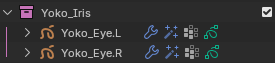
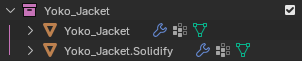
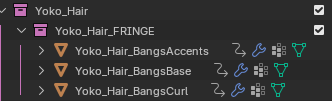
Collections and Objects should always start with the full AssetName
No special characters like +=#^*&^$()?!
Underscores '_' separate items
Dots '.' denote L/R and alternate versions
_ALLCAPS denote collections that are controlled or created by scripts
For anime, the _EYES collection and _FRINGE collection typically receive _ALLCAPS
Suffixing a collection with "_VLH" or "_VLS" will signal to the renderer that this collection should be rendered on it's own pass
_VLS = View Layer Solo - will render the collection with no occlusion
_VLH = View Layer Holdout - will render the collection with occlusion
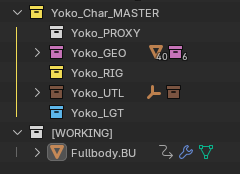
Any object that should not be part of the Asset should be placed inside a [WORKING] collection outside of the _MASTER collection and properly versioned.
The user may make as many additional collections in the [WORKING] collection as they wish.
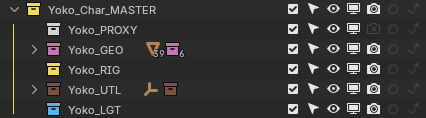
Asset File Collections:
PROXY = Contains only geometry for the Asset's animation proxy. This collection will always be turned off for final renders.
GEO = Contains the final full-resolution mesh for an Asset
RIG = Contains the rig for an Asset
UTL = Utility collection. Contains Empties for FX or Shaders, Widgets for rigging, and extra objects. Typically is excluded from view in all steps.
LGT = Lighting collection. Lights that must belong to a specific asset go here.
For anime, character "Sun" lights should always be named AssetName_Subject_Sun

No comments to display
No comments to display