
The Pipeline ™
The WS Pipeline is a set of organizational standards and automation tools meant to reduce the amount of "busywork" that occurs during production.
The WS Pipeline Tools are meant to be lightweight, minimally intrusive, and match existing Blender design philosophies so that it feels like a cohesive experience with a small learning curve.
The Pipeline Flow:
To generalize, this is the flow of a WS project:
- Yellow = Animation Production
- Blue = Asset Production
- Pink = Sound Production
- Green = Music Production
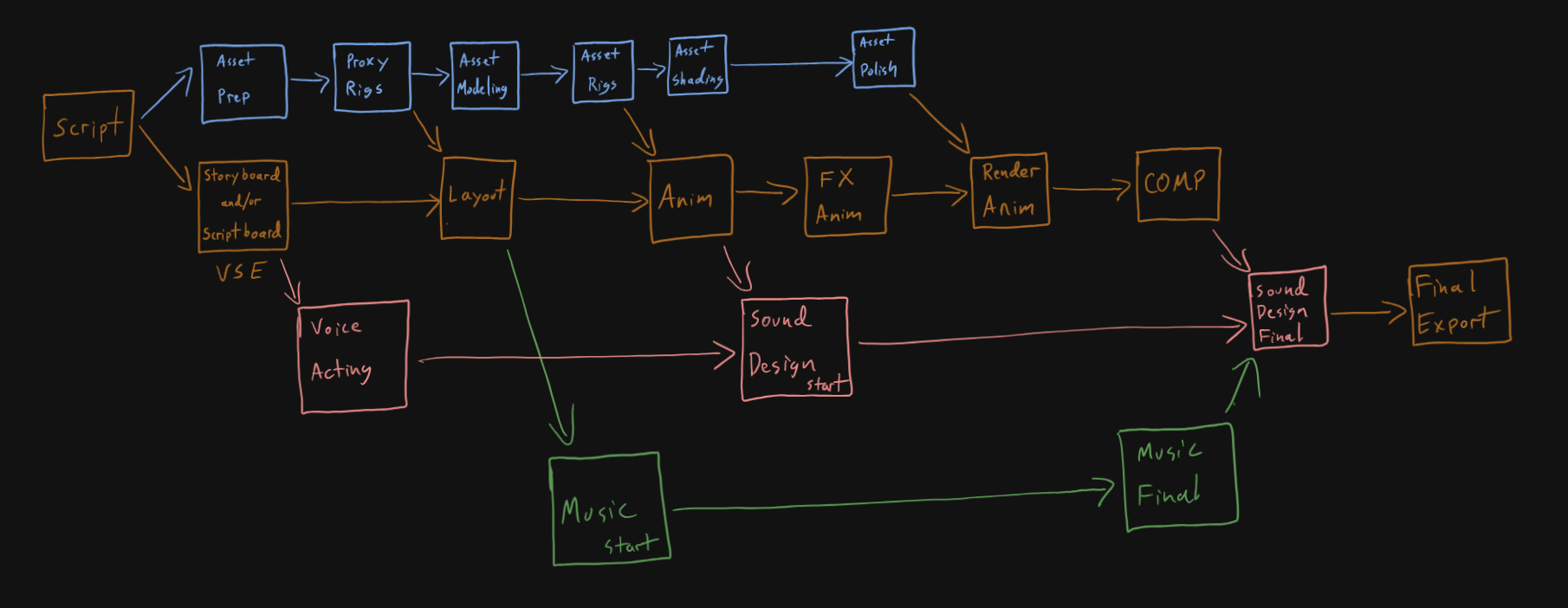
Every block is dependent on at least the Script, but most require information from some other aspect of the pipeline in order to begin. This chart, then, is also a map of the priority of tasks.
The Animation Pipeline:
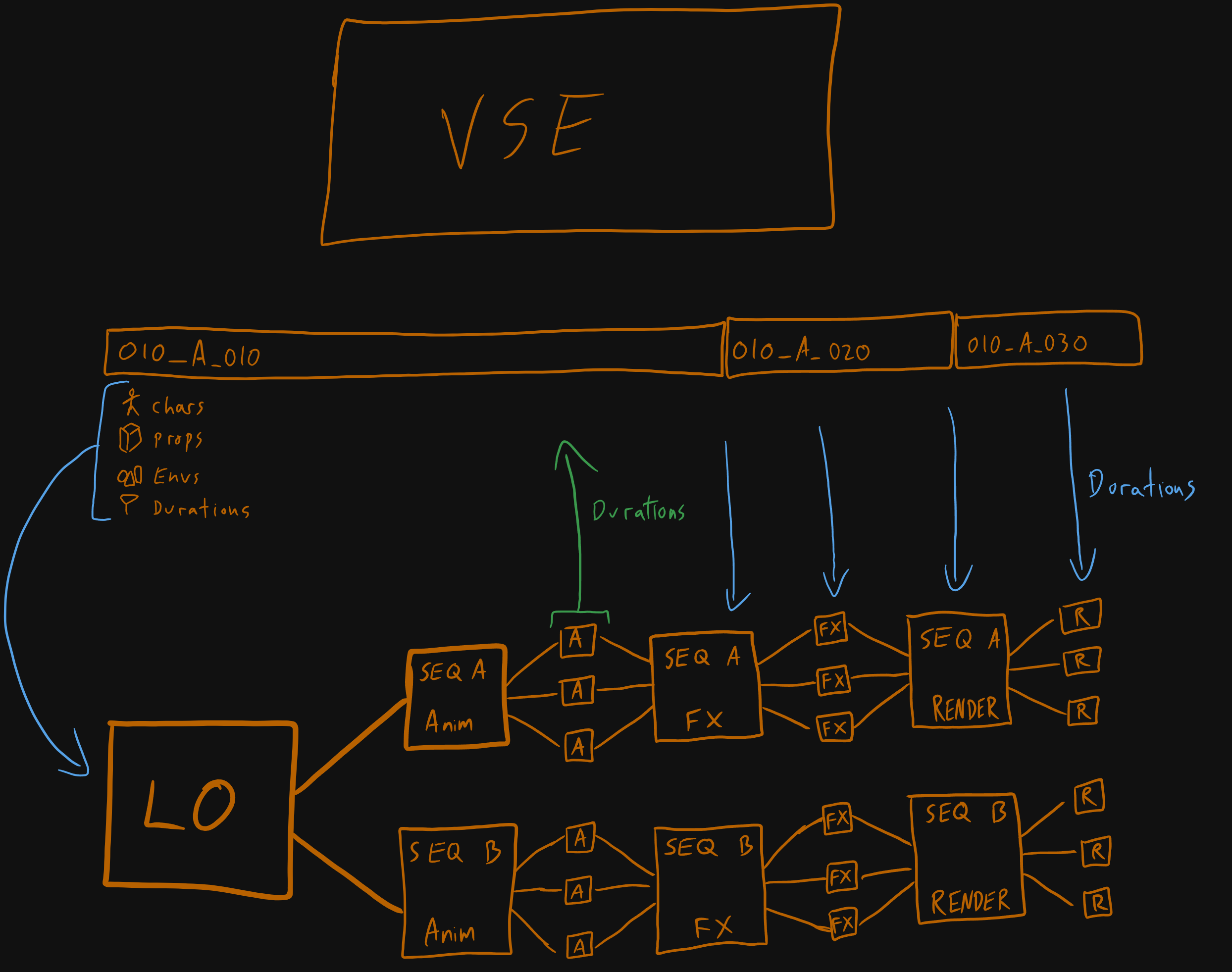
Starting with Storyboards/Scriptboards we can explore the Animation Pipeline in greater detail.
VSE/Edit:
The VSE (Video Sequence Editor in Blender) is the Command-Information-Center of the entire production. It should always hold the most up-to-date information for every shot in a project, and houses a suite of tools to help manage the production files from one place.
The VSE is also the first file created on a project. A rough edit will be outlined by a Director or Editor using storyboards or simple scriptboards. Shot Strips will be named in a pipeline compatible way with Scenes, Sequences, and Shots.
Each Shot Strip may also be Asset Tagged. Asset Tagging connects an existing Asset File to the Shot Strip so that it may be automatically loaded into the Layout, Anim, or FX files upon generation.
Layout:
Once the Shot Strips are named, tagged, and roughly timed, a Layout File can be generated. Each Layout File contains only the shots that share a scene, with each scene having its own Layout File. An artist may adjust shot duration and timings within a Layout File, as well as add extra assets if they choose.
Once Layout is complete, any timing or asset changes made get synced back to the VSE in preparation for generating Anim files.
Anim:
Anim files refer to both Sequence and Shot files. These are files that animators are assigned and in which they will do their work.
Typically, a Sequence will be a short collection of 3-4 shots. An animator may choose whether they want to animate in the Sequence file or the individual Shot files. There is no major distinction between the two as far as the Pipeline is concerned. The individual Shot files will be copies of the Sequence file until a Shot file is localized manually by an artist who wants to make shot-specific adjustments.
Note: Once you have localized an individual Shot file, any changes you make to that shot within the Sequence file will be completely overwritten.
FX:
Anim on Characters and Props is linked forward into the FX files. Like Anim, FX has both Sequence and Shot files, allowing an FX artist the opportunity to work on multiple shots at once.
LGT (Lighting):
Anim on Character and Props, as well as FX from the FX files, are all linked forward into the LGT files. This is where artists may make lighting changes.
Render:
Everything from all previous steps is combined into a master RENDER file. This is where View Layers and Render Properties are applied, and where the shot is rendered from.
Comp:
EXR sequences that are rendered from the RENDER file are brought into Comp files. (Need to develop Look-ID system)
No comments to display
No comments to display