
Shot Files - Internal Naming
All shot files should contain these collections:
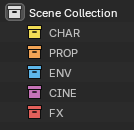
All assets, generated objects, or helper objects should live within the collection pertaining to their STEP.
Ex: Empties used to offset animation should all live within the CHAR collection.
Layout Temp FX and Placeholders:
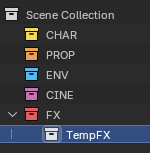
All temp FX and placeholders made during the Layout or Animation STEPs should be placed in the TempFX subcollection.
Asset_GROUPS:
Linked Assets are automatically sorted into subcollections of their Asset_TYPE. This allows Asset grouping for view layers.
This process can also be done manually without breaking anything.

If a PROP asset begins with the same AssetName as CHAR asset, then it will be placed inside the CHAR asset's _GROUP.