
Asset Files - File Naming
AssetName_Type_STEP.user.v001.blend
ex: YokoYoshino_Char_MODELING.v003.blend
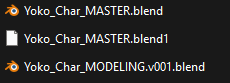
Rules:
- No Spaces, use PascalCase to denote word separations
- Keep asset names simple yet unique
- No special characters like +=#^*&^$()?!
- Underscored '_' separate items
- Dots '.' denote versions, users, or user tags
- If you can avoid using a last name or second word for the AssetName while keeping it unique, do so.
- Props always start with the name of the character they belong to, if applicable.
ex: YokoNecklace_Prop_MASTER.blend
Possible Types:
- Char = Characters
- Prop = Props that are separate from Characters or Environments. Includes Vehicles.
- Env = Environments
- Fx = Effects
- Ast = Generic Assets that are part of a Library. Usually things like Trees, rocks, road signs, ect. Typically not linked into shot files directly.
- Lib = Library. This file contains several Generic "Ast" Assets.
Possible PROGRESS:
- MASTER = The main production file. This file is the only asset file that gets linked into shot files.
- MODELING
- RIGGING = also applies to geometry nodes
- SHADING
- COMP
Additional/optional tags:
After the dot '.' at the end of PROGRESS, the user may make notes as to where they left the file or who is working on it.
- ex: Yoko_Char_RIGGING.wyatt.v001.blend
- ex: Yoko_Char_MODELING.jacketRetopo.blend