Naming Conventions
Standards and Best-Practices regarding the naming of files, folders, assets, objects, layers, rigs, materials, ect.
- Asset Files - File Naming
- Asset Files - Internal Naming
- Shot Files - File Naming
- Shot Files - Internal Naming
- What we call things
Asset Files - File Naming
AssetName_Type_STEP-user-version.blend
ex: YokoYoshino_Char_MODELING-v003.blend
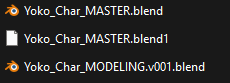
Rules:
- No Spaces, use PascalCase to denote word separations
- Keep asset names simple yet unique
- No special characters like +=#^*&^$()?!
- Underscored '_' separate items
- Hyphens '-' separate temporary items like versions, users, or user tags
- If you can avoid using a last name or second word for the AssetName while keeping it unique, do so.
- Props always start with the name of the character they belong to, if applicable.
ex: YokoNecklace_Prop_MASTER.blend
Possible Types:
- Char = Characters
- Prop = Props that are separate from Characters or Environments. Includes Vehicles.
- Env = Environments
- Fx = Effects
- Ast = Generic Assets that are part of a Library. Usually things like Trees, rocks, road signs, ect. Typically not linked into shot files directly.
- Lib = Library. This file contains several Generic "Ast" Assets.
Possible PROGRESS:
- MASTER = The main production file. This file is the only asset file that gets linked into shot files.
- MODELING
- RIGGING = also applies to geometry nodes
- SHADING
- COMP
Additional/optional tags:
After the dot '.' at the end of PROGRESS, the user may make notes as to where they left the file or who is working on it.
- ex: Yoko_Char_RIGGING-wyatt-v001.blend
- ex: Yoko_Char_MODELING-jacketRetopo.blend
Asset Files - Internal Naming
Top level: AssetName_COLLECTION
Sublevels: Assetname_Collection
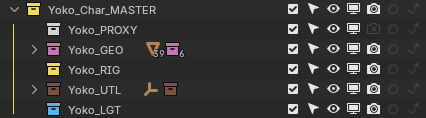
Rules:
- No Spaces, use PascalCase to denote word separations
- Keep asset names simple yet unique
- Collections and Objects should always start with the full AssetName
- No special characters like +=#^*&^$()?!
- Underscores '_' separate items
- Dots '.' denote L/R and alternate versions
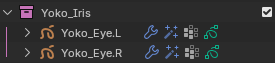
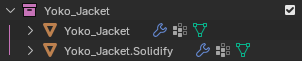
- _ALLCAPS denote collections that are controlled or created by scripts
- For anime, the _EYES collection and _FRINGE collection typically receive _ALLCAPS
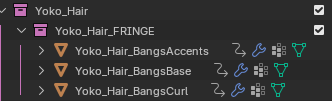
- Suffixing a collection with "_VLH" or "_VLS" will signal to the renderer that this collection should be rendered on it's own pass
- _VLS = View Layer Solo - will render the collection with no occlusion
- _VLH = View Layer Holdout - will render the collection with occlusion
- Any object that should not be part of the Asset should be placed inside a [WORKING] collection outside of the _MASTER collection and properly versioned.
- The user may make as many additional collections in the [WORKING] collection as they wish.
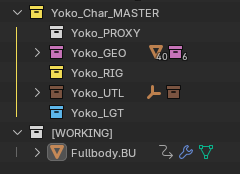
Asset File Collections:
- PROXY = Contains only geometry for the Asset's animation proxy. This collection will always be turned off for final renders.
- GEO = Contains the final full-resolution mesh for an Asset
- RIG = Contains the rig for an Asset
- UTL = Utility collection. Contains Empties for FX or Shaders, Widgets for rigging, and extra objects. Typically is excluded from view in all steps.
- LGT = Lighting collection. Lights that must belong to a specific asset go here.
- For anime, character "Sun" lights should always be named AssetName_Subject_Sun
- ex: Yoko_Face_Sun; Yoko_Body_Sun
Shot Files - File Naming
Layout Files:
[Scene]_LO-user-version.blend
ex: 010_LO.blend <-Pipeline-valid sequence file
ex: 022_LO-tony-v003.blend <-user backup or working copy
Sequence Files:
[Scene]_[Sequence]_STEP-user-version.blend
ex: 010_B_ANIM.blend <- Pipeline-valid sequence file
ex: 022_C_FX-baku-v002.blend <- user backup or working copy
Shot Files:
[Scene]_[Sequence]_[Shot]_DescriptiveName_STEP-user-version.blend
ex: 010_B_030_YokoDrives_ANIM.blend <- Pipeline-valid shot file
ex: 022_C_010_SierraSings_FX-baku-v002.blend <- user backup or working copy
- Scene = Scene Number
Typically three numbers. Scenes always count up by tens (10s) to leave room for additional insert scenes.- Scenes always start counting at 010. The next scene, by default, would be 020.
- Sequence = Sequence Letter
Typically a single letter. Sequences count up through the alphabet starting at 'A' and going to 'Z'.- Always Uppercase
- 'I' and 'O' are skipped
- Shot = Shot Number
Functions the same as Scene Numbers - DescriptiveName = Optional! A user may choose to give a shot a very brief descriptive name to aid comprehension when working with multiple shots.
- Can denote a distinguishing factor such as a camera angle, character, or action in the shot.
- Limit to 3 words, if possible.
- STEP = Marks the pipeline step for the shot file
- User = Optional! While working on a shot, a user may use this space to denote:
- alternate versions
- progress
- their name to show who is working on it
- backups
- Version = a temporary addendum to the shot file to save versions or backups.
IMPORTANT! Shot files MUST NOT include "-user" and "-version" tags in order to be Pipeline-valid.
Rules:
-
Underscores '_' separate items that identify the shot (Scene, Shot, DescriptiveName, Step)
-
No spaces. Use PascalCase to denote word separations
-
Hyphens '-'are used to mark versions or users for local files. Should not be present on final pipeline files
-
No special characters like +=#^*&^$()?!
-
Keep DecriptiveNames simple, less than 3 words if possible.
-
Steps are always ALLCAPS for legibility
Possible Steps:
- LO = Layout
-
ANIM = Animation
-
FX = Effects, 2D and/or 3D
-
LGT = Lighting
-
RENDER = Final, Renderable file
Best Practices:
-
DescriptiveNames are optional, but should be used wherever possible
-
If a user adds User/Version tags to a file locally, they should always push their changes into the main pipeline file when they are done, and make sure it saves without the additional tags
-
When inserting a new shot between existing shots, give it a number halfway between the two original shots
- ex: Shot 020_015 would go between 020_010 and 020_020
Shot Files - Internal Naming
All shot files should contain these collections:
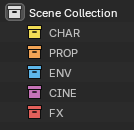
- CHAR = Holds all Characters and their Props
- PROP = Holds all Props that do not belong to a Character
- ENV = Holds all Environments, Env Lighting, and Env Assets
- CINE = Holds all Cameras, Camera rigs, Lighting, and Light Blockers
- does not include lights belonging to linked libraries
- FX = Holds all FX assets
All assets, generated objects, or helper objects should live within the collection pertaining to their STEP.
Ex: Empties used to offset animation should all live within the CHAR collection.
Layout Temp FX and Placeholders:
All temp FX and placeholders made during the Layout or Animation STEPs should be placed in the TempFX subcollection.
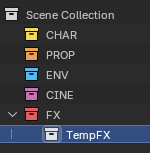
Asset_GROUPS:
Linked Assets are automatically sorted into subcollections of their Asset_TYPE. This allows Asset grouping for view layers.
This process can also be done manually without breaking anything.

If a PROP asset begins with the same AssetName as CHAR asset, then it will be placed inside the CHAR asset's _GROUP.
What we call things
What we call things:
- Ahoge = Hair antenna or cowlick
- Fringe = This part of the hair
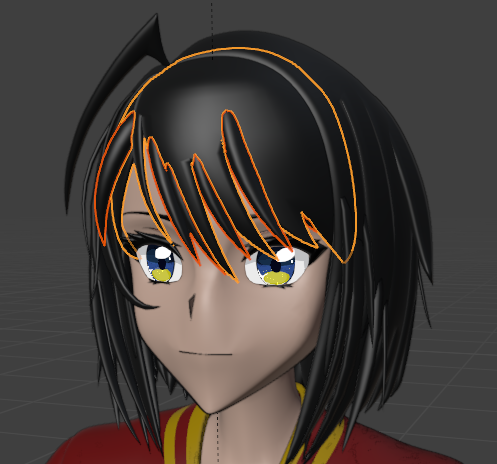
- Lineart = Lineart made with Geometry
- Fullbody = A character's base mesh or full body mesh. Usually not including the head or face.
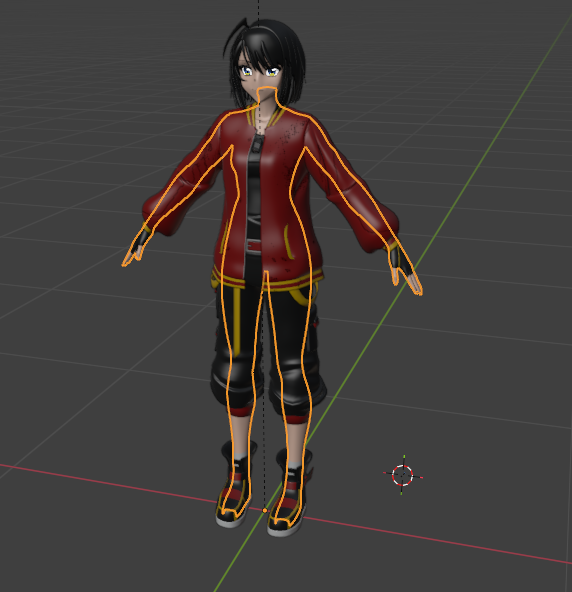
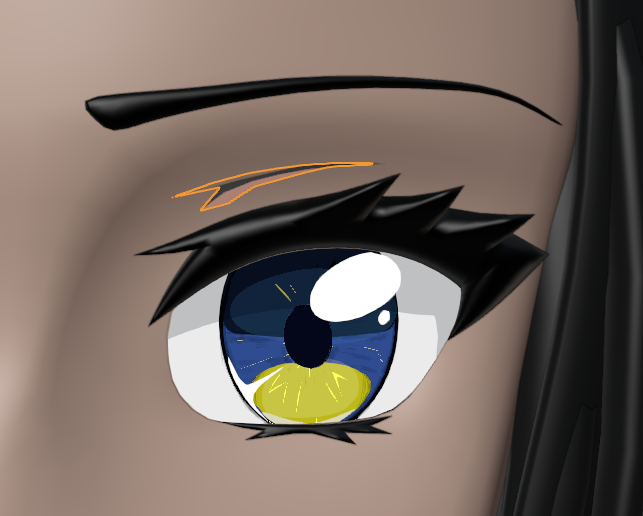
- Iris = The colored part of the eye
- Sclera = The white part of the eye
- Eyelight = The highlight, specular, or reflection on the eye. Usually its own mesh and object.
- ScleraShadow = The special effect mesh that casts a "shadow" on the white part of the eye
- EyeShadow = Makeup around the eye
- EyelidCrease = The line above the eyelashes and between the eyebrows.